


ELECOM EX-G Trackball Mouse
- 2.4GHz USB wireless receiver, 10 meter range
- 750 or 1500 DPI, switchable
- 6 programmable buttons with tilt scroll
- Thumb-operated ball, right-hand design
- Windows Vista to 10 and macOS 10.10 or later
- 3.7 x 4.9 x 1.9 inches, 1 year manufacturer warranty
Last refreshed Oct 2, 2026 · Based on the Amazon listing and published specifications, not hands-on testing.
A right-handed, thumb-driven trackball that moves the cursor without moving the wrist. The battery type is listed two ways, so check before buying a cell.
As an Amazon Associate I earn from qualifying purchases. ProductDome earns a commission when you buy through links on this page.
ASIN: B016QCPNUWModel: M-XT3DRBKCategory: Trackballs
Overview
ELECOM makes this wireless trackball for the thumb, with a ball held by bearings and a USB receiver that handles the connection. Six buttons and tilt scrolling sit within reach of the same hand.
The reason to choose a trackball is that the body stays still while only the thumb moves, which is how the maker says it reduces wrist strain. The limits are a right-hand-only shape and conflicting battery size entries in the listing.
Who it's for
Anyone who works at a cramped desk, edits long documents or spends hours pointing will find the stationary body easier on the arm. A lefty, or a user who prefers moving the whole hand, should stay with a conventional mouse.
Pros and cons
- Ball removes through the underside hole
- Switchable resolution settings
- Six buttons with tilt scrolling
- Battery remaining light included
- Right-handed shape only
- Battery size conflicts in the listing
- Horizontal scrolling fails on one Windows variant
Performance notes
The optical sensor reads ball movement, and the switchable resolution changes how far the pointer travels for each turn of the ball. Dirt on the ball bearings is the usual cause of drag, and the underside hole lets the ball be pushed out for cleaning. A USB receiver carries the signal wirelessly, and walls or other devices can shorten the reach.
Specifications
| Brand | エレコム(ELECOM) |
|---|---|
| Model | M-XT3DRBK |
| Dimensions & fit | |
| Item Dimensions L x W | 4.9 x 3.7 x 1.9 inches |
| Hand Orientation | Right |
| Item weight | 4.5 ounces without battery |
| Capacity & performance | |
| Range | 10 meters |
| Compatibility & installation | |
| Connectivity Technology | 2.4GHz USB wireless receiver |
| Included components | |
| Included Components | Receiver, trackball mouse, English and Japanese manuals |
| Warranty & support | |
| Warranty Description | 1 year manufacturer |
| Other details | |
| Button Quantity | 6 programmable, tilt scroll |
| Movement Detection | Optical |
| Operating System | Windows Vista, 7, 8.1, RT8.1, 10 or later; macOS 10.10 or later |
| Mouse Maximum Sensitivity | 750 or 1500 DPI, switchable |
Closest rivals on specs
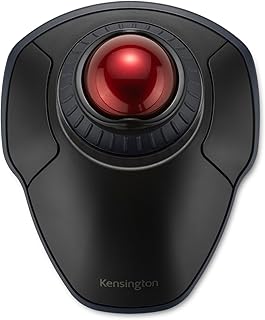 Kensington Orbit Wireless Trackball with Scroll Ring
- Item Weight 0.44 vs 0.35 pounds (+26%)
 Kensington Orbit Trackball Mouse with Scroll Ring
- Item Weight 0.44 vs 0.35 pounds (+26%)
 Kensington Orbit Trackball Mouse
- Item Weight 0.44 vs 0.6 pounds (-27%)
Frequently asked questions
How do I clean the ELECOM EX-G ball?
The description says the ball is held by ball bearings and can be popped out by pushing it through the hole in the bottom, which makes it easy to clean.
What battery does the ELECOM EX-G use?
The listing is inconsistent: one entry says one AAA battery is required, while the description says one AA battery is included. Check the seller before assuming a size.
Does the ELECOM EX-G work on Windows RT 8.1?
Yes, but horizontal scrolling does not work there, per the system requirements.
Is the ELECOM EX-G for left-handed users?
No. The listing gives right as the hand orientation.