
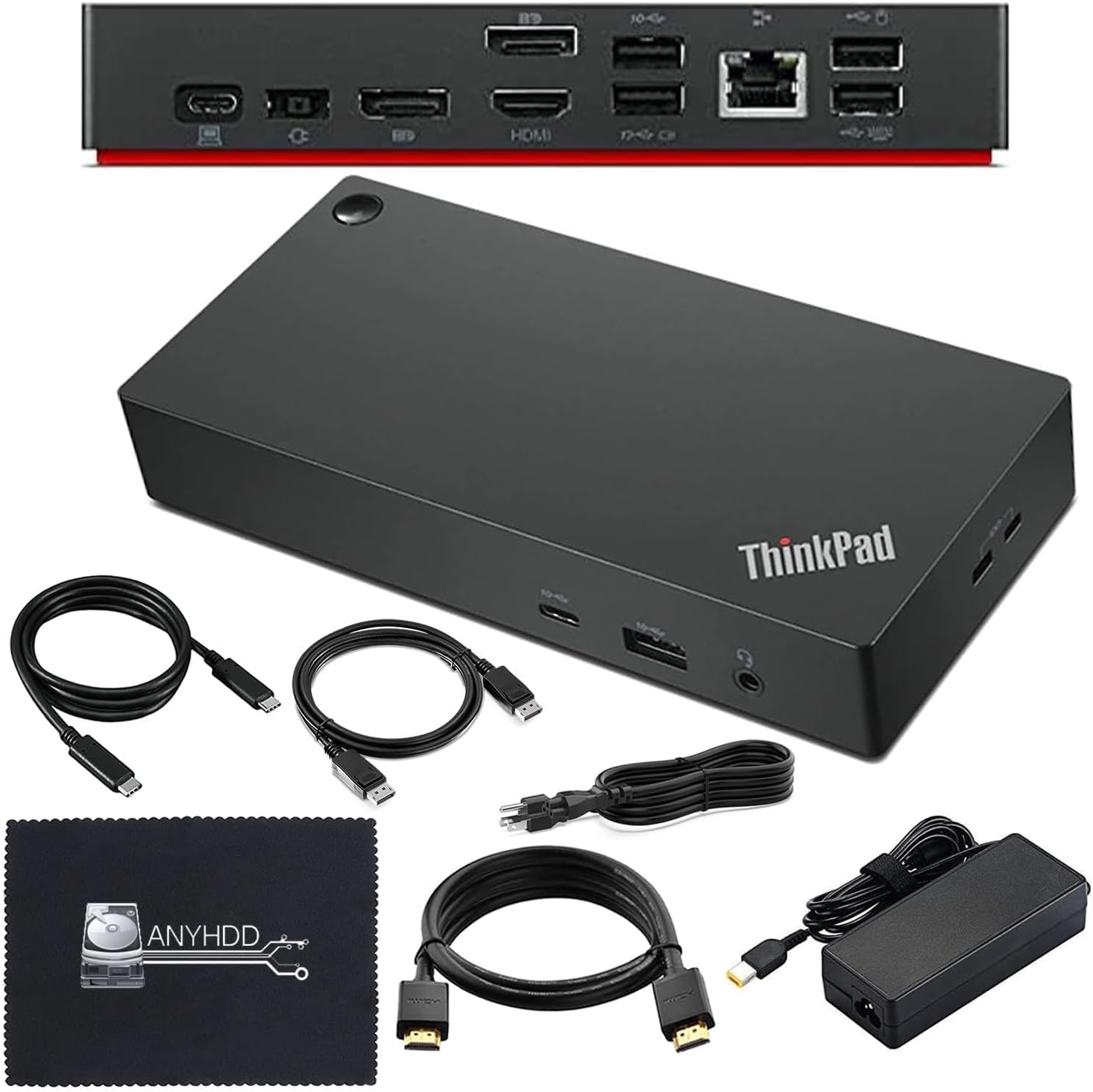
Lenovo ThinkPad 40AY0090US Docking Station with 90W Adapter
- ThinkPad dock with 90W AC adapter
- HDMI, DisplayPort, USB-C, Ethernet
- 11 ports, 6 USB, 1 HDMI
- 4K HDMI and 4K DisplayPort cables included
- Windows 10 minimum
Updated 25 days ago · Based on the Amazon listing and published specifications, not hands-on testing.
A ThinkPad dock bundle with a power adapter and display cables for a two monitor desk. The listing calls it both a USB-C dock and a Thunderbolt workstation dock, so confirm the model and your laptop port first.
As an Amazon Associate I earn from qualifying purchases. ProductDome earns a commission when you buy through links on this page.
ASIN: B0DJDWNTSNCategory: Laptop Docking Stations
Overview
ThinkPad owners setting up a home desk get a dock that adds HDMI, DisplayPort, USB and Ethernet through one connection, bundled with a power adapter. The kit includes display cables and a cloth, so monitors connect straight away.
Bundled cables and adapter make a ThinkPad desk ready to use in one box. The listing contradicts itself on whether this is a USB-C or Thunderbolt dock, and its warranty term is unclear.
Who it's for
Workers on the named ThinkPad T, X, E, L and P models who want monitors, network and accessories on a single cable. Owners of other brands or newer machines should check compatibility carefully.
Pros and cons
- Power adapter in the bundle
- HDMI and DisplayPort cables included
- Wired Ethernet port
- Six USB ports
- USB-C versus Thunderbolt naming conflict
- Warranty term unclear in listing
- Firmware update may be required
Performance notes
Display and data run over the single laptop connection, so the number and resolution of monitors depend on what the laptop port supports. Charging comes from the supplied adapter through the dock. When a laptop is not recognised, a dock firmware update is the suggested fix.
Specifications
| Brand | ANYHDD |
|---|---|
| Dimensions & fit | |
| Item weight | 16 ounces |
| Capacity & performance | |
| Wattage | 90 |
| Construction & materials | |
| Color | Black |
| Compatibility & installation | |
| Hardware interface | DisplayPort, Ethernet, HDMI, USB 3.1 Type A, USB 3.1 Type C, USB Type C |
| Compatible devices | ThinkPad V340-17IWL, E490, E590, L390, P53s, T480, T480s, T490, T490s, T495, T495s, T590, X270, X1 Carbon 6th and 7th Generation, X1 Yoga 3rd and 4th Generation, X280, X390 Yoga, X395, X1 Tablet Generation 3 |
| Other details | |
| Total number of HDMI ports | 1 |
| Total USB ports | 6 |
| Number of ports | 11 |
| Builtin media | Dock, 90W AC adapter, USB-C cable, 4K HDMI cable, 4K DisplayPort cable, microfiber cloth |
| Minimum required operating system version | Windows 10 |
Frequently asked questions
How do I set up the Lenovo 40AY0090US dock with my ThinkPad?
Connect the 90W adapter to the dock, run the included USB-C cable to the laptop, then attach monitors with the included HDMI and DisplayPort cables. If the laptop is not recognised, update the dock firmware.
Is this a Thunderbolt 4 dock?
The listing is inconsistent: it calls it a universal USB-C dock and also a Thunderbolt 4 Workstation Dock. Confirm with your laptop port before buying.
Which ThinkPads does it support?
The listing names models including T480, T490, T590, X1 Carbon 6th and 7th Generation, E490, L390 and P53s.
Are display cables included?
Yes, a 4K HDMI cable and a 4K DisplayPort cable.