 Best Overall
Laptop Docking Stations
Dell USB 3.0 Ultra HD/4K Triple Display Docking Station D3100
- Total number of HDMI ports
- 1
- Total USB ports
- 7
- Warranty description
- Not specified
- Hardware interface
- USB
 USUnited States
As an Amazon Associate I earn from qualifying purchases. ProductDome earns a commission when you buy through links on this page.
Best Overall
 Popular Pick
A one cable desk setup for Surface devices that charges the computer and drives two Ultra HD monitors. It connects through Surface Connect, so it is meant for Surface devices rather than any USB-C laptop.

A Dell universal dock that adds multiple Ultra HD monitors and USB ports to a wide range of USB-C and older USB laptops. Laptop charging is not stated, so plan on using the laptop's own charger.

A compact single cable dock for offices that mix notebook brands and want multi monitor desks with IT management built in. Charging output to the notebook is not stated, so check it against a power hungry laptop.


A desk dock that turns one USB-C cable into dual HDMI monitors, wired network and a wide spread of USB ports for Windows laptops. Mac users get the same picture on both screens, not two separate desktops.

A pocketable dock that turns any USB-C laptop into a dual monitor desk setup with wired networking. Charging power depends on which adapter you pair with it, so confirm what your laptop needs.

A travel-ready dock that puts a handheld PC, Switch, phone or tablet on a TV with controllers and wired internet while it charges. A power adapter is not listed in the box, so bring your own.


A capable home office dock for USB-C Windows laptops that need three screens, wired network and laptop charging from one cable. On a Mac the external screens all show the same image.

A capable enterprise dock for offices that manage fleets of laptops with dual monitors. The listing bullets describe an unrelated laptop, so confirm exactly what ships.

A small travel dock that adds fast USB, a UHD capable HDMI output and laptop charging pass through. It drives only one external display and no Ethernet port is listed.
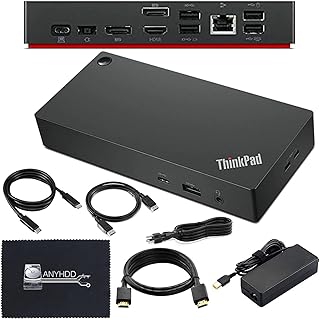
A ThinkPad dock bundle with a power adapter and display cables for a two monitor desk. The listing calls it both a USB-C dock and a Thunderbolt workstation dock, so confirm the model and your laptop port first.

A sensible dock for owners of the listed Dell Latitude, XPS and Precision laptops who want desk gear behind a Thunderbolt link. The larger Precision workstations still need their own charger plugged in.
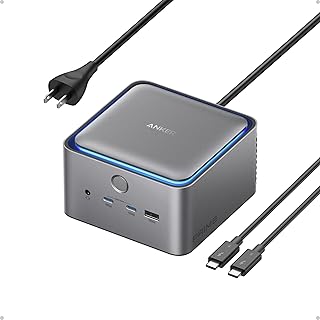
A capable single-cable desk hub for recent Thunderbolt laptops and Pro or Max MacBooks; check your exact laptop against the compatibility list before ordering.

A compact Dell dock that adds Ethernet, HDMI, audio and USB ports with power delivery to the laptop. Compatibility is listed for Dell devices only, and the host connection type is not stated.

A capable USB-C dock for supported Dell laptops with multiple display outputs and laptop charging in one cable. Charging tops out below the adapter output, and some higher power Dell models need their own charger too.

A powerful Thunderbolt dock for creative pros who need fast storage, many displays, ten gigabit Ethernet and strong laptop charging from one cable. Older Thunderbolt hosts lose some features.

A compact USB-C dock that connects displays, Ethernet and accessories through one cable. The laptop charging wattage is not stated.

A modular Thunderbolt dock for multi-monitor desks with full IT management features. The fastest charging applies to Dell laptops, and power for other brands is not listed.

A Dell Thunderbolt dock that turns a laptop into a desk setup with an HDMI display and extra ports. The sparse listing leaves the exact port mix and box contents unconfirmed.
As an Amazon Associate I earn from qualifying purchases.
Dell USB 3.0 Ultra HD/4K Triple Display Docking Station D3100Model D3100Lenovo ThinkPad Ultra Docking Station 40AJ0135USModel 40AJ0135USMicrosoft Surface Dock 2Model Surface Dock 2Dell D6000 Universal DockModel D6000HP USB-C Dock G5Model 5TW10AA#ABALenovo ThinkPad Thunderbolt 3 Dock Gen 2 40AN0135USModel 40AN0135USDell WD15 4K Monitor Dock with 180W AdapterModel WD15Dell WD19TB Thunderbolt Docking StationModel WD19TBThese 8 laptop docking stations have the highest ProductDome scores among the established products in this category, meaning ones with a large volume of owner ratings and strong evidence; on a tie, the product with more rating evidence ranks first. The score combines owner satisfaction, rating volume, demand and data quality from public Amazon listings (updated 3 days ago). We do not test products ourselves.
Dell, Anker, HP, Lenovo, ANYHDD lead this category among the 9 brands that passed our curation checks.
A listing appears only when it has a recorded price, a minimum customer rating, and enough ratings or monthly sales. Generic and unbranded listings are left out, while every real brand stays, including brands sold only on Amazon. The ones that pass are ordered by the ProductDome score, which weighs owner satisfaction, rating volume, demand and data quality.
Laptop docking stations connect a laptop to monitors, a keyboard, a mouse, a network cable and other devices through one cable, and they range from small travel hubs to desktop docks that also charge the laptop. The first decision is the connection your laptop has, because a dock that relies on a high bandwidth port will not run two or three monitors from a basic port, and some laptops only output video on specific ports.
Monitor support is the most common source of disappointment. Check how many external displays the dock supports with your laptop and at what resolution and refresh rate, since many docks mirror screens on some laptops instead of extending them. Among the 13 products that list output power, most fall between 106 and 286 watts, and 180 watts is typical. Charging power matters as well: a dock that delivers less power than the laptop's own charger can leave a busy laptop draining its battery while plugged in.
Ports are the next choice. Count the devices you use every day: monitors, a wired network cable, a keyboard and mouse, card readers, audio and drives. Docks with more ports usually need their own power supply. Vertical and horizontal designs differ only in shape, but a vertical dock takes less desk space.
Before buying, check the laptop compatibility list in the listing, the video outputs and maximum resolutions, the charging power, whether a power adapter and cables are included, and whether drivers are needed. If you work on several laptops from different makers, choose a dock that lists them all, and update the laptop's firmware before blaming the dock for problems. For hybrid work, a second power adapter and a small travel hub for the laptop bag save unplugging the desk setup every day. Firmware updates for the dock itself fix many monitor and charging issues, so check whether the maker offers an update tool.
How we list products: every listing here has a recorded price, a minimum customer rating and enough ratings or monthly sales. Generic and unbranded listings are left out; every real brand stays, including brands sold only on Amazon. Products are ordered by the same ProductDome score on every page.Editorial policy