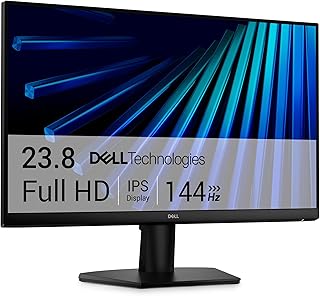
A plain full HD office monitor with an adjustable stand and thin bezels for multi-screen desks. Its refresh rate and resolution are built for work, not gaming.
Samsung Odyssey G5 G51F QHD Gaming Monitor 27 Inch
Model: S27FG512EB
A well-rounded QHD gaming monitor that earns its place over the FHD options here through resolution and stand ergonomics, provided 180Hz is fast enough.
Buyers who kept it describe a reliable everyday monitor with useful built-in speakers, though the stand's height ceiling is worth checking against your desk before buying.
A smooth, fully adjustable Full HD monitor with speakers for office work and casual gaming. Full HD on a large screen looks soft up close, so text-heavy users may want higher resolution.
A slim, light portable monitor with a protective smart cover and both USB-C and mini HDMI inputs, for laptops and consoles. Response time is slow for fast gaming.
A fast, wide curved monitor for gamers who want high refresh and ultrawide immersion at modest resolution. Text is softer than on denser screens, and the top refresh rate needs DisplayPort.
A sensibly specced QHD monitor for mixed work and play, worth considering mainly for the refresh rate and adjustability rather than any standout feature.
A 27 inch WQHD Fast IPS gaming monitor with a 180Hz refresh rate and both G-Sync and FreeSync, suited to players stepping up from 1080p without going to 4K.
A fast, bright OLED gaming monitor with deep blacks, rich color and fast HDMI inputs for consoles. The glossy finish reflects room lights, and OLED care routines are part of ownership.
A sharp Ultra HD IPS monitor with entry HDR certification and a fully adjustable stand for work and media. It lacks Type-C video, so laptops need HDMI or DisplayPort.
An office and casual gaming monitor with a fast refresh rate and eye comfort certifications. It has no DisplayPort or height adjustment, so plan around HDMI and tilt only.
A large Ultra HD smart monitor that doubles as a streaming TV and a computer free workspace, with a camera for calls. It has no TV tuner in the box and only sixty hertz, so it is not a gaming or broadcast TV replacement.
These 9 computer monitors have the highest ProductDome scores among the established products in this category, meaning ones with a large volume of owner ratings and strong evidence; on a tie, the product with more rating evidence ranks first. The score combines owner satisfaction, rating volume, demand and data quality from public Amazon listings (updated 3 days ago). We do not test products ourselves.
What are the most popular computer monitors brands?
Samsung, LG, Dell, msi, Asus lead this category among the 29 brands that passed our curation checks.
How does ProductDome pick these computer monitors?
A listing appears only when it has a recorded price, a minimum customer rating, and enough ratings or monthly sales. Generic and unbranded listings are left out, while every real brand stays, including brands sold only on Amazon. The ones that pass are ordered by the ProductDome score, which weighs owner satisfaction, rating volume, demand and data quality.
About computer monitors
Start with the desk space available and whether the monitor must fit into a travel bag: desktop models commonly use a separate stand, while portable displays may rely on a folding cover or kickstand. Allow room for the support as well as the screen when deciding which format fits.
Use the screen size filter to narrow the physical fit, then look up the monitor’s complete width and height: the diagonal measurement leaves out the frame and stand. Among the 25 products that list screen size, most fall between 14 and 27 inches, and 27 inches is typical. For a desk, compare the stand’s depth with the space remaining behind your keyboard. A shallow desk may leave too little viewing distance to take in a wide screen comfortably; for a curved model, assess whether its size and curve suit that distance and your seating position. For travel, compare the packed dimensions with your bag’s compartment and include the protective cover and power equipment in the carrying load.
For games and other fast movement, compare refresh rate with the frame rate your computer can deliver in the games you play; a higher advertised ceiling may go unused. Treat response time separately, and look for the picture setting used to achieve it, since aggressive settings can introduce visible trails or halos. In a bright room, screen finish matters alongside brightness: a reflective surface opposite a window can remain distracting even with the backlight raised. For long work sessions, look for stand height and tilt adjustments that let you position the screen comfortably without stacking objects underneath it.
Before buying, match the monitor’s video inputs to the outputs on your computer or dock, and verify that the monitor, connection and cable support your chosen resolution and refresh rate together. Use the total number of HDMI ports filter to allow for devices you want connected without swapping cables. The number of component outputs field needs clarification in the listing: identify the actual connectors and whether they accept video from your equipment. Some portable displays accept video and power through the same connection; confirm that your computer supports both functions. Built-in speakers and an audio socket serve different needs, so verify which is provided if you expect sound. Check whether the required video cable, power supply and any portable support cover are supplied or sold separately.
How we list products: every listing here has a recorded price, a minimum customer rating and enough ratings or monthly sales. Generic and unbranded listings are left out; every real brand stays, including brands sold only on Amazon. Products are ordered by the same ProductDome score on every page.Editorial policy
Cookie settings
We use necessary cookies to keep the site working. Page views are counted without cookies. With your permission, we also use functional and marketing cookies. Cookie Policy.

 Best Overall