As an Amazon Associate I earn from qualifying purchases. ProductDome earns a commission when you buy through links on this page.
Best Overall
Tablets
Apple iPad 11-inch A16 Tablet 128GB
Model: iPad (A16)
A capable everyday tablet for streaming, notes, schoolwork and light editing, with Touch ID and a fast Apple chip. The entry storage fills quickly with video, and pencil and keyboard are extra.
A dependable, fast everyday iPad for study and entertainment at a lower price than the Air or Pro, as long as you are fine buying the keyboard and Pencil separately.
A capable all round Android tablet for students and families who want a stylus and water resistance included. The fast charging needs a separate charger, and the screen is LCD, not OLED.
Samsung Galaxy Tab A9+ 11 Inch Android Tablet 64GB
A sensible family tablet for streaming, schoolwork and light games, with a big screen and room to add storage. Modest memory and internal space limit heavier apps, so plan on a microSD card.
Samsung Galaxy Tab A8 10.5 Inch Android Tablet 32GB
A sensible family tablet for streaming, reading and kids content in a Galaxy household. Base storage and memory are modest, so plan on a memory card for downloads.
A light everyday tablet for streaming, reading and kids' apps with long video battery life. Memory and storage are modest, so heavy multitasking and big game libraries are a stretch.
A friendly small tablet for reading, streaming and kids' apps at home with expandable storage. It is the international Wi-Fi model, so it has no cellular data and the charger comes from the seller, not Samsung.
A family-friendly mid-range tablet with a smooth large screen, quad speakers and roomy storage. It is an international model without a US warranty, which matters if repairs are needed.
Samsung Galaxy Tab S9 11 Inch Android Tablet 256GB
A strong Android tablet for note-taking, sketching and gaming, helped by the bundled pen and a fast screen. Several listing fields conflict, so check memory details against Samsung's own spec page.
XPPen Magic Drawing Pad Standalone Drawing Tablet 12.2 Inch
A sensible all-in-one sketching slate for students and hobby artists who want to work away from a desk. Its operating system and app support are not listed, so confirm your art software runs on it first.
A large screen Android tablet with a smooth high refresh display and cellular data for streaming, reading and sheet music. The Unisoc chip is a budget processor, so heavy games and demanding apps will feel slow.
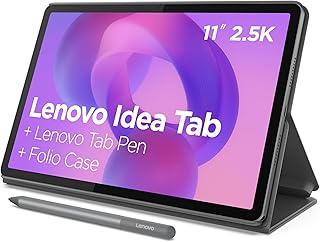
A well-equipped student tablet on paper, bundling a pen and case that would otherwise cost extra, though the 4GB RAM keeps it firmly in the budget tier.
A large screen Android tablet with LTE, four speakers and pen support for drawing and notes. The stylus is not in the box and the processor is midrange, so heavy games and art apps can lag.
A large NXTPAPER tablet for note taking, sheet music and drawing, with the stylus and flip case in the box. The standard refresh rate and missing cellular option make it a study and desk tablet more than a gaming or travel one.
A large screen Android tablet for video, reading and video calls, with a protective case in the box and room to add storage. Physical memory is modest and the advertised figure counts virtual memory, so expect it to slow under heavy multitasking.
A sensible everyday tablet for anyone who wants mobile data on a large screen without tethering to a phone. The wall charger and memory card are both sold separately.
A sharp E-Ink note tablet with a battery free pen, AI transcription and Android app support, sold as a full bundle. Battery life is listed two different ways.
A budget Android tablet kit with a keyboard, mouse and stylus for note taking and streaming. The modest screen resolution and short battery claim limit it as a laptop stand-in.
These 10 tablets have the highest ProductDome scores among the established products in this category, meaning ones with a large volume of owner ratings and strong evidence; on a tie, the product with more rating evidence ranks first. The score combines owner satisfaction, rating volume, demand and data quality from public Amazon listings (updated 3 days ago). We do not test products ourselves.
Amazon, Samsung, Lenovo, Apple, TECLAST lead this category among the 16 brands that passed our curation checks.
How does ProductDome pick these tablets?
A listing appears only when it has a recorded price, a minimum customer rating, and enough ratings or monthly sales. Generic and unbranded listings are left out, while every real brand stays, including brands sold only on Amazon. The ones that pass are ordered by the ProductDome score, which weighs owner satisfaction, rating volume, demand and data quality.
About tablets
General-purpose tablets suit apps and video, while electronic-paper tablets focus on reading and handwritten notes; check whether an electronic-paper model supports the apps and moving content you need. Some drawing tablets require a connected computer, so establish whether standalone operation is supported before choosing one for use away from a desk. Before comparing dimensions or storage, establish whether essential work, school or creative apps provide the features you need on the tablet’s operating system. If you expect to replace a laptop, investigate desktop-dependent tasks such as specialist software, browser extensions and handling external drives.
Once those requirements are met, choose screen size according to whether you will mostly hold the tablet for reading or prop it up for documents and keyboard work. Among the 10 products that list screen size range, most fall between 8.1 and 12 inches, and 11 inches is typical. A larger screen gives documents and side-by-side apps more room, provided the software supports that layout, but can be awkward to hold while reading in bed or standing on a commute. A smaller screen takes up less room in a crowded bag, though full-page documents may require more zooming. Use item weight to judge carrying and holding comfort, allowing for the extra weight of a protective case or keyboard.
Size storage around downloaded video, games and offline documents, allowing for space taken by the system. The memory storage capacity filter helps narrow how much the tablet holds, but verify that the listing distinguishes storage from working memory. Where memory cards are supported, establish whether they can hold apps or just files, and whether a card is supplied or sold separately. For internet access away from a home, work or public wireless connection, decide whether you can use your phone’s hotspot or need a tablet with cellular capability and a compatible mobile data plan.
Accessories need to match the exact tablet model and generation: keyboards, cases and active pens can depend on specific connectors, dimensions or pen technology. For handwritten notes or drawing, verify compatibility with the intended pen; a compatible pen or keyboard may be supplied or sold separately. Charging equipment also varies, so establish whether a charger is included and what the manual specifies for a replacement. Check the manufacturer’s stated software support period, since access to security updates affects how long the tablet remains suitable for connected use.
How we list products: every listing here has a recorded price, a minimum customer rating and enough ratings or monthly sales. Generic and unbranded listings are left out; every real brand stays, including brands sold only on Amazon. Products are ordered by the same ProductDome score on every page.Editorial policy
Cookie settings
We use necessary cookies to keep the site working. Page views are counted without cookies. With your permission, we also use functional and marketing cookies. Cookie Policy.

 Best Overall