As an Amazon Associate I earn from qualifying purchases. ProductDome earns a commission when you buy through links on this page.
Best Overall
External Hard Drives
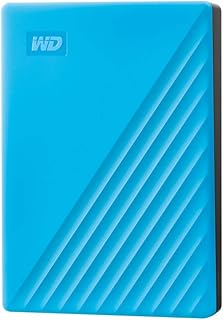
WD My Passport WDBYVG0020 Portable Hard Drive 2TB
Model: WDBYVG0020BBK-WESN
A straightforward, affordable way to back up 2TB of files with password protection, provided you install WD's software to unlock the security features.
A reasonable choice for backing up a laptop on the move, with Acronis software that adds ransomware protection. Mac owners have to reformat it first, and no usable transfer speed is published.
A high-capacity portable drive for backups and archives, with password protection and backup software bundled. It is a spinning disk, so it is slower and more fragile than an SSD.
A light, encrypted entry-size backup drive for documents and photos, with backup software included. Video collections will fill it fast, and USB-C-only laptops need an adapter.
A compact encrypted backup drive for PC laptops and desktops, with ransomware-aware software included. The USB-A cable means USB-C-only laptops need a separate adapter.
WD My Passport WDBPKJ0040BBL Portable Hard Drive 4TB
Model: WDBPKJ0040BBL-WESN
A sensible portable backup drive for laptops and game consoles that need lots of room in a small case. Its mechanical disk asks for careful handling, and the backup software must be downloaded separately.
A sensible portable drive for backing up a laptop or adding console storage, with hardware encryption built in. The listing gives no usable transfer speed, so speed-sensitive users should look for measured figures first.
A Mac-ready portable drive that works with Time Machine straight out of the box, with encryption for private files. Capacity is small by current standards.
A roomy, encrypted portable backup drive with software that guards against ransomware. It is a spinning hard drive with a USB-A cable, so speed is modest and USB-C laptops need an adapter.
A pocketable external drive for backing up photos, videos and documents from a PC or adding game console storage. It is a mechanical drive, and the listing's transfer speed figures do not agree, so real speed is unclear.
A slim, encrypted portable drive for backups and file transport across PCs, Macs and consoles. It is a spinning hard drive, so it is slower and less drop tolerant than an SSD.
A pocket-sized high capacity backup drive with hardware encryption that plugs into both USB-C and USB-A devices. It is a spinning hard drive, so it is slower than a portable SSD.
A pocket-size mechanical drive with hardware encryption and password-protected backup software for routine PC backups. Its spinning disk is better at storing files than editing large video straight off the drive.
A portable drive for moving files between a PC and a Mac or adding storage to a console, with backup software and password protection from the maker. Speed figures in the listing are not usable, so buy it for capacity.
WD My Passport Portable External Hard Drive 5TB 6-Pack
A case of six large portable hard drives with hardware encryption and backup software for offices or IT stock. Mechanical drives are slower and less shock tolerant than SSDs.
A slim older WD drive that suits ultrabook owners who want automatic backups and a password lock. Capacity is modest, and newer models have replaced it.
WD My Passport Ultra WDBBKD0020BBK Portable Hard Drive 2TB
A secure portable drive with hardware encryption and backup software for laptop owners who carry private files. Mac users must reformat it, and it is a spinning disk.
WD My Passport Ultra Metal Edition Portable Hard Drive 2TB
A sleek metal portable drive with password-locked hardware encryption and automatic backups. It needs reformatting for Mac, and it is still a spinning hard disk.
A plug-and-play USB-C portable hard drive for backups and file storage on Windows and Mac. As a spinning drive, it is slower and more fragile than a portable SSD.
These 10 external hard drives are the most searched brands and models among the established products in this category (monthly searches for each brand and model); on a tie, the one with more owner ratings ranks first. Product data comes from public Amazon listings (updated 15 days ago). We do not test products ourselves.
What are the most popular external hard drives brands?
Seagate, Western Digital, Digital, LaCie, TOSHIBA lead this category among the 22 brands that passed our curation checks.
How does ProductDome pick these external hard drives?
A listing appears only when it has a recorded price, a minimum customer rating, and enough ratings or monthly sales. Generic and unbranded listings are left out, while every real brand stays, including brands sold only on Amazon. The ones that pass are ordered by how many people search for that brand and model each month; review counts only break ties.
About external hard drives
External hard drives come in portable formats for carrying between computers and desktop formats intended to stay beside a workstation. External Solid State Drives are a nearby alternative for frequent travel because they have no spinning mechanism; a hard drive needs protection from knocks while running. Start by deciding how much storage your files and planned backups need, including whether the drive will serve a single computer or hold files from several devices.
Base capacity on the space your current files occupy, then allow room for new photos, videos and other growing folders. Among the 28 products that list digital storage capacity, most fall between 0.5 and 5.3 tb, and 2 tb is typical. A drive for a backup history needs more room than one holding a single copy of the same files, so compare your proposed capacity with your backup software’s guidance for retention and available space. The digital storage capacity filter is the starting point for this decision, but usable space will be lower after formatting, and your computer may display capacity using different units.
For large video folders or frequent full backups, compare sustained transfer performance for that task, rather than choosing by the advertised connection speed. Actual transfers depend on the computer’s port, the drive mechanism and whether you are moving large files or many small ones. Compatibility is a separate purchase gate: confirm support for your operating system and intended backup software. If you will move files between different operating systems, check which drive format supports reading and writing on both. Reformatting may be necessary and erases existing contents, so establish the required format before putting files on the drive.
Before buying, match the supplied cable’s computer connector to your ports and establish whether an adapter is required and included or sold separately. Check the power requirements for any format: some drives take power through the data cable, while others need a separate supply that should be listed among the contents. For carrying or desk placement, use the enclosure’s actual dimensions; the internal disk’s form factor does not give the complete housing size. An Aluminum enclosure label leaves impact protection unclear, so look for an explicit description of any protective features. If you need password protection, confirm whether it requires software and whether that software works on every computer where you will unlock the drive.
How we list products: every listing here has a recorded price, a minimum customer rating and enough ratings or monthly sales. Generic and unbranded listings are left out; every real brand stays, including brands sold only on Amazon. Products are ordered by monthly searches for their brand and model on every page.Editorial policy
Cookie settings
We use necessary cookies to keep the site working. Page views are counted without cookies. With your permission, we also use functional and marketing cookies. Cookie Policy.


 Best Overall