As an Amazon Associate I earn from qualifying purchases. ProductDome earns a commission when you buy through links on this page.
Best Overall
Deadbolts
Yale Assure Lock 2 WiFi Keypad Smart Deadbolt
A capable Wi-Fi keypad deadbolt that skips the hub and handles scheduled guest codes well. Check your router band first, since the listing contradicts itself on which Wi-Fi band it joins.
A sound choice for anyone who wants app and voice control without changing the outside of the door. Battery details are missing from the listing, so check them before you commit.
A strong choice for Apple households that already run a Thread hub and want true hands-free entry. Without that hub and a recent iPhone or Watch, the signature unlock feature does not work.
A clean choice for Apple Home users who want a smart deadbolt that looks like an ordinary one. Remote access and keypad entry both need extra purchases.
A smart deadbolt for Apple households that want the door to open on arrival without tapping anything. The hands-free feature depends on recent Apple hardware and a Thread hub, so homes without that gear lose the headline feature.
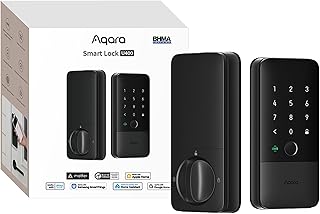
A sound choice for a front door owner who wants app control, guest codes and phone-based unlocking without buying a hub. Remote features rely on home Wi-Fi, and battery details are missing from the listing.
A straightforward keypad deadbolt with auto lock, one-time guest codes and a re-keyable SmartKey cylinder. It has no remote or app control in the listing, so codes are managed at the door.
A keypad deadbolt for homes that already run a Z-Wave hub such as SmartThings or Ring Alarm. Without a compatible hub its smart features are off, leaving code and key entry only.
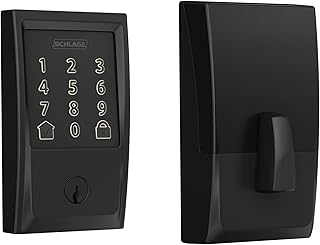
A straightforward keypad deadbolt for front, back and garage doors where codes replace keys. The listing is thin on code counts, batteries and door fit, so check those with Schlage.
A well-connected smart deadbolt for homes running Apple Home or another major platform. Battery life is shorter than the cell count suggests, so expect regular changes.
A smooth keyless deadbolt for iPhone households that want tap-to-unlock with Apple Home Key. Sharing home keys and remote HomeKit control need an Apple home hub.
A sound fit for homes already running a Z-Wave hub that want fingerprint entry tied into lights and alarms. Without a compatible hub, the remote features do not work.
A fingerprint and keypad deadbolt that joins a Z-Wave smart home for remote locking, sharing and alerts. It needs a compatible Z-Wave hub, so it is not a standalone Wi-Fi lock.
Kwikset SmartCode 270 Deadbolt with San Clemente Handleset
A matching keypad deadbolt and handleset for a front door upgrade in matte black with keyless entry. The spec sheet names Wi-Fi, yet no app features appear anywhere in the listing.
A well-built fingerprint deadbolt with a genuinely useful app and eufy doorbell tie-in, but its IP53 rating and the moisture complaints in its reviews make it a better fit for a covered entry than one exposed to weather.
A hidden smart deadbolt for people who want app and HomeKit locking while the door looks unchanged. It is discontinued, so a newer model may be the safer buy.
A HomeKit-first fingerprint deadbolt whose standout features, Home Key tap unlock and third-party voice control, both lean on hub hardware that is not included in the box.
A sensible add-on for SimpliSafe households, locking the door whenever the alarm arms and reporting every entry. It does nothing outside a current SimpliSafe system.
A retrofit smart lock for renters and homeowners who want app control and auto-unlock without changing the outside of the door. No keypad comes in the box.
These 10 deadbolts are the most searched brands and models among the established products in this category (monthly searches for each brand and model); on a tie, the one with more owner ratings ranks first. Product data comes from public Amazon listings (updated 15 days ago). We do not test products ourselves.
Kwikset, Yale, Schlage, Veise, eufy lead this category among the 34 brands that passed our curation checks.
How does ProductDome pick these deadbolts?
A listing appears only when it has a recorded price, a minimum customer rating, and enough ratings or monthly sales. Generic and unbranded listings are left out, while every real brand stays, including brands sold only on Amazon. The ones that pass are ordered by how many people search for that brand and model each month; review counts only break ties.
About deadbolts
Many mechanical deadbolts use a key for outside entry; electronic models may offer codes, app access or both. Start by deciding whether to replace the existing deadbolt completely or use a retrofit mechanism that retains compatible exterior hardware, especially if keeping your current key is important.
Door preparation determines which installation route will work. For a replacement, compare your door thickness, bore hole dimensions and backset, the distance from the door edge to the hole’s center, with the listing’s supported measurements. A retrofit needs an explicit match to the existing lock’s mechanism and tailpiece, not simply enough room on the door. Among the 22 products that list item weight, most fall between 1 and 4 pounds, and 2.6 pounds is typical. Weight cannot tell you whether the lock fits or how well it resists forced entry; for security, look for documented security certification covering the exact model. Measure clearance around nearby handles, trim and glass for both the exterior assembly and the interior housing. The bolt must also align with the strike and extend fully into the frame without needing you to lift or push the door.
Next, decide how entry and exit should work in your household. For shared access, look for individually removable codes if you need to withdraw someone’s access without changing everyone else’s. For any deadbolt, confirm whether the inside operates with a thumbturn or requires a key; a key-dependent exit can delay someone trying to leave quickly. If phone control matters, establish whether your intended task works nearby or remotely. The connectivity filter alone cannot tell you whether your intended connected features require a hub, an account or a subscription. If a hub is required, establish whether it is supplied or sold separately.
Before buying, check the permitted installation environment for the deadbolt, including whether its interior housing can tolerate exposure on a gate or an unheated entryway. For an electronic lock, review battery requirements and the low-battery warning. Confirm which backup entry method the model supports when its batteries are depleted and what you must supply to use it, including whether any necessary key or emergency power accessory is included or sold separately. Material descriptions such as Metal, Zinc and Aluminum need clarification about which components they describe, particularly the bolt and exterior housing. If you want to match other door hardware, compare the stated finish across the visible pieces. Confirm whether the package includes the strike, suitable mounting hardware and any adapters required for your installation.
How we list products: every listing here has a recorded price, a minimum customer rating and enough ratings or monthly sales. Generic and unbranded listings are left out; every real brand stays, including brands sold only on Amazon. Products are ordered by monthly searches for their brand and model on every page.Editorial policy
Cookie settings
We use necessary cookies to keep the site working. Page views are counted without cookies. With your permission, we also use functional and marketing cookies. Cookie Policy.


 Best Overall